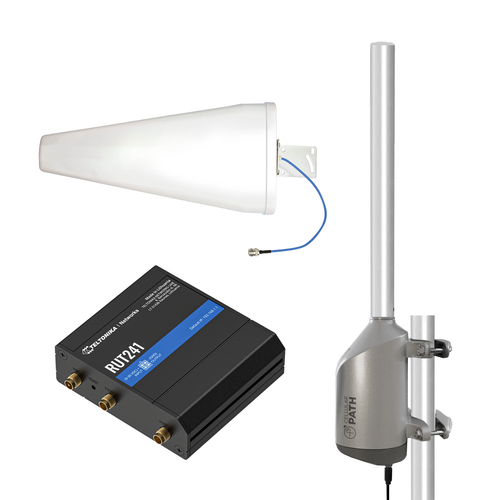
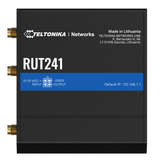
Looking to set up a 4G FWA network for your home, small business, cabin, or stationary RV? The Teltonika RUT241 4G LTE Bundle with SOCA is a game changer!
The included RUT241 router by Teltonika uses the 4G LTE network to deliver reliable internet with speeds up to 150 Mbps. It’s perfect for everyday, low-bandwidth-consuming connectivity needs. Connect laptops, phones, tablets, and more via WiFi or Ethernet. All it needs is an active SIM card from your desired carrier (not included).
Purpose-built to maximize the signal reaching the router for better performance, this bundle includes a Bolton Quicksilver Yagi antenna. It installs outdoors and captures stronger, clearer signals from farther away compared to standard router antennas.
With the No-Modem SOCA system, you don’t have to worry about aiming the Yagi antenna yourself. It auto-performs a 360° signal scan and aims the antenna towards your carrier’s most optimal cell tower to capture the best possible signal. The Cellular Path app makes it easy to set up the No-Modem SOCA as well as manage multiple systems from one dashboard, view detailed RF signal data, and remotely re-align the antenna if needed. The No-Modem SOCA requires a WiFi connection.
The result is a smarter fixed wireless access setup. Stronger signal. More reliable speeds. Less frustration.
Which Carriers Does This Bundle Work With?
The Teltonika RUT241 supports all US carriers, including AT&T, T-Mobile, and Verizon. Insert a SIM card from your preferred provider, and the router will connect to that network. During setup, the system will scan and optimize antenna alignment based on the carrier associated with the installed SIM card.
Why Does the No-Modem SOCA Need a WiFi Connection?
The No-Modem SOCA connects to WiFi to communicate with Cellular Path servers. This allows it to send RF signal data to the portal and receive remote alignment commands when adjustments are needed. It can connect to the RUT241 4G router’s WiFi.
Can I Use This Bundle in an RV?
Yes, but only when stationary. The directional antenna needs to be aimed towards the strongest signal source. If you move to a new location, the antenna will need to be realigned. We highly recommend taking the SOCA rotator mount down before driving to prevent damage.
Can I Manage the Teltonika RUT241 4G Router Through the Cellular Path App?
No. You can only manage the No-Modem SOCA through the Cellular Path App. The Teltonika RUT241 router has its own separate interface for configuration and monitoring.
Are There Any Subscription Fees?
The router requires an active SIM card to provide internet connectivity using cellular networks. This means you will need a data plan from a supported carrier, which has a monthly service charge.