
Cell Phone Signal Booster or WiFi Calling: Which is Best?
Comparing WiFi Calling and Cell Signal Boosters
When your business, office, warehouse, or home struggles with poor 5G or 4G LTE service, two common solutions usually come up: WiFi calling and cell phone signal boosters. Both can help you stay connected indoors, but they solve the problem in very different ways.
WiFi calling routes calls and texts through your internet connection, while a cell phone signal booster improves the actual cellular signal inside your building. So, when comparing WiFi calling vs cellular signal boosting, which is the better choice? Below, we'll break down how each option works, where each one falls short, and which solution makes the most sense for reliable everyday connectivity.
We fix poor cell phone signal! Find the right signal booster for you:




What Is a Cell Phone Signal Booster?
A cell phone signal booster improves weak cellular signal inside a building. Instead of using your WiFi network to place calls, it strengthens existing cell signal from nearby cell towers and redestributes that singal indoors.
Here's how it works: an exterior antenna is mounted outside the building where the cellular signal is strongest. That antenna captures the available 5G or 4G LTE signal and sends it to an amplifier, which boosts the signal. Then, one or more indoor antennas broadcast the improved signal throughout your home, office, warehouse, retail space, or commercial property. For a more detailed breakdown, you can read our guide on how a cell phone signal booster works.
Unlike WiFi calling, a cell phone signal booster does not rely on your internet connection. It improves the actual cellular connection for calls, texts, and data. Plus, once it's installed, there are no monthly fees. It is a one-time equipment purchase designed to provide stronger, more reliable indoor cellular coverage.
| Benefits of Cell Phone Signal Boosters | Drawbacks of Cell Phone Signal Boosters |
| Improves actual cellular signal for calls, texts, and 5G/4G LTE data | Requires some usable outside cellular signal to work |
| Works with cellular-enabled devices automatically, without users joining a network | Requires equipment installation, including an outdoor antenna |
| Supports multiple users at the same time | Larger commercial spaces may need a more advanced system design |
| Does not depend on WiFi or internet service | Upfront cost is higher than simply enabling WiFi calling |
| Helps maintain cellular connectivity during internet or WiFi outages | Performance depends on outside signal strength, building layout, and system power |
| No monthly service fees after purchase | May require professional installation for large buildings or complex coverage areas |
What Is WiFi Calling?
WiFi calling, on the other hand, allows your phone to make and receive calls and texts over a WiFi network instead of relying only on a cellular connection. If your indoor cell signal is weak but your internet connection is strong, WiFi calling can help you stay connected without extra equipment.
Most modern smartphones and major carriers support WiFi calling, but it usually needs to be enabled in your phone settings first. Once turned on, your phone can use the WiFi network for calls and texts when cellular service is limited. For step-by-step instructions, see our guide on how to turn on WiFi calling on iPhone and Android.
When comparing WiFi calling vs cellular service, the biggest difference is what each option depends on. WiFi calling relies on your internet connection and WiFi network. A cellular booster relies on available outdoor cell signal and improves that signal indoors.
| Benefits of WiFi Calling | Drawbacks of WiFi Calling |
| Usually available at no extra equipment cost if you already have WiFi | Only works when the device is connected to a strong WiFi network |
| Helps make calls and send texts in areas with weak indoor cell signal | Does not improve actual cellular reception |
| Easy to enable on most modern smartphones | Call quality depends on internet speed, WiFi strength, and network congestion |
| Useful for homes, small offices, and buildings with reliable internet | Calls may drop when moving out of WiFi range or switching between access points |
| Can reduce reliance on weak indoor cellular service | If the internet or WiFi network goes down, WiFi calling goes down with it |
| Does not require installing antennas or amplifier equipment | Not ideal for large commercial spaces with many simultaneous users |
| Easy to use once connected to the WiFi network | Can create security and access-control concerns if employees, guests, or visitors need to join your WiFi network |
Where WiFi Calling Falls Short
WiFi calling is the sort of solution that works until it doesn't. If you're at home with a strong internet connection and only one or two people using the network, it can be a helpful workaround for poor cell reception. But if you're managing an office, warehouse, school, healthcare facility, retail space, or other commercial building, the limits become easier to see.
WiFi Calling Depends on Your Internet Connection
WiFi calling is only as reliable as your WiFi network. If your internet goes down, your WiFi network has issues, or your ISP experiences an outage, your calls and texts can go down with it. And if the cellular signal inside your building is already weak, your phone may not have a reliable cellular fallback.
Weak or Congested WiFi Can Hurt Call Quality
Streaming, video meetings, gaming, connected security systems, smart devices, and everyday internet use all compete for the same bandwidth. When your WiFi network is weak, congested, or overloaded, your calls can become choppy, delayed, or dropped. That can make simple moments, like calling a family member, or everyday work tasks, like processing payments and sending invoices, much more frustrating than they need to be.
WiFi Coverage Has Physical Limits
WiFi calling only works where your WiFi network reaches. Step into a stairwell, elevator, parking garage, loading dock, basement, or far corner of the building outside WiFi range, and your call may fail if cellular service is not strong enough to take over.
Handoff Issues Can Lead to Dropped Calls
As you move through your home or a commercial building, your phone may need to switch between WiFi access points or move from WiFi calling back to cellular. If that transition is not smooth, or if the cellular signal is too weak to take over, your call can drop. This is one of the biggest differences in the WiFi calling vs cellular conversation: cellular service is built for mobility, while WiFi is limited by the reach of your network.
WiFi Calling Can Complicate Emergency Calls
With WiFi calling, 911 location accuracy may be based on your registered emergency address rather than a real-time cellular location. That does not mean WiFi calling is unsafe, but it does mean you should understand how emergency calls are routed and what location information may be available during an emergency.
Commercial WiFi Networks Have Added Security & Access Challenges
In commercial spaces, your employees, guests, vendors, or visitors may need to connect to your WiFi network for WiFi calling to work. That can create security and access-control concerns, especially if your IT team limits guest access, separates internal and public networks, or has to manage permissions for many different users. Dozens or hundreds of simultaneous users can also strain network capacity. Plus, WiFi itself is not free. You still pay for internet service, networking equipment, access points, maintenance, and upgrades to keep the system running.
So, does WiFi help with cell phone reception? Not exactly. WiFi calling can help your phone make calls when cellular signal is poor, but it does not improve the actual cell phone reception inside your building. It depends on your internet connection instead of fixing the weak cellular signal problem.
Where Cell Phone Boosters Have the Edge Over WiFi Calling
A cell phone signal booster has one major advantage over WiFi calling: it improves the actual cellular signal inside your building. Instead of routing calls through your internet connection, a booster strengthens the available outdoor cell signal and brings it indoors, so your phones and cellular-enabled devices can connect the way they were designed to.
Boosters Improve the Actual Cellular Signal
A booster improves cellular signal for calls, texts, and 5G or 4G LTE data. That makes it a stronger solution if your business relies on mobile phones, tablets, hotspots, point-of-sale systems, security equipment, or other cellular-connected devices.
Devices Connect Automatically
With WiFi calling, users often have to join your WiFi network and enable the feature on their phones. With a cell phone signal booster, there is no network to join and no setting to turn on. Once the system is installed, compatible cellular devices connect automatically.
Boosters Can Support Multiple Carriers
With the right equipment and setup, commercial cell phone signal boosters can support multiple carriers. That means employees, visitors, customers, tenants, and devices using different cellular providers can all benefit from stronger indoor coverage.
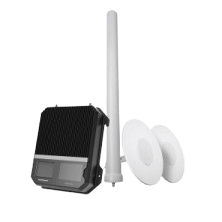
A professional installed cell phone signal booster for small businesses needing more reliable cellular in up to 15,000 sq ft.
Learn MoreBoosters Work Independently of WiFi
A cell phone signal booster does not depend on your internet connection. If your WiFi network slows down or your ISP goes down, your boosted cellular signal can still stay active. The one requirement is that there must be some usable cellular signal outside the building for the booster to capture and amplify.
Cellular Coverage Supports Better Mobility
With WiFi calling, calls can drop when you move out of WiFi range, switch between access points, or try to hand off from WiFi to weak cellular service. With a booster, calls stay on the cellular network as you move through the building and out of the boosted coverage area, reducing the risk of WiFi-related handoff problems.
Commercial Booster Systems Can Scale
A small office may only need coverage in a few rooms, while a warehouse, school, hospital, apartment building, or corporate facility may need a more robust system. Commercial booster systems can be designed around your square footage, building materials, outside signal strength, and user demand.
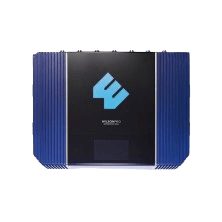
Commercial-grade cell phone booster with turnkey installation. Improves coverage in key areas, eliminates in-building dead zones, and alleviates WiFi overload.
Learn MoreNo Monthly Service Fees
WiFi depends on ongoing internet service, network equipment, access points, maintenance, and upgrades. A cell phone signal booster is a one-time equipment purchase with no monthly service fees. For businesses that need stronger cellular service every day, that can make a booster a more reliable long-term solution than relying on WiFi calling alone.
Cell Phone Signal Booster vs WiFi Calling: Which Is Best for You?
The best option depends on what you need your connection to do. WiFi calling can be a good fit when you have strong, reliable internet, limited users, and no major concerns about mobility. A cell phone signal booster is usually the better fit when you need dependable cellular coverage for multiple users, larger spaces, or everyday business operations.
WiFi Calling May Be Enough If...
WiFi calling may work well if you already have a strong WiFi network, your internet connection is stable, and your calls are not competing with heavy bandwidth use. It can also be a low-cost option if you do not want to install extra hardware and only need better calling in a small area, such as a home office or small business.
It may also be enough if you are comfortable depending on your WiFi network for calls and texts. For some users, especially those with excellent internet and limited cellular needs, WiFi calling is a reasonable workaround.
A Cell Phone Signal Booster Is Better If...
A cell phone signal booster is the better choice if you need to keep multiple devices connected without putting more traffic on your WiFi network. Because calls, texts, and cellular data stay on the cellular network, a booster can help free up WiFi bandwidth for laptops, video meetings, smart devices, and other internet-based tools.
A booster is also a stronger option if you are in a rural area with limited internet options, or if you want reliable cellular service even when your WiFi or ISP goes down. For businesses, that added layer of connectivity can make a real difference during outages, busy workdays, and high-traffic periods.
You may also want a booster if people need to move throughout your building without dropped calls. This is known as mobility. Instead of depending on WiFi access points or handoffs between WiFi and cellular, your devices can stay connected to the cellular network as employees, visitors, customers, or equipment move through the property.
Security is another factor. WiFi calling requires users to connect to a WiFi network, which may not be ideal for guest access, internal IT policies, or businesses that want to reduce unnecessary network traffic. A cell phone booster does not require users to join your WiFi network, making it a cleaner option for many commercial environments. See our guide for more information on WiFi vs cellular security.
Find the Right Solution for Better Cell Signal
WiFi calling can be useful when your internet is strong, your WiFi network is reliable, and your cellular needs are simple. But it does not fix poor cell phone reception. If your WiFi slows down, your internet goes out, or you move outside WiFi range, the same connection problems can come right back.
A cell phone signal booster solves the underlying signal problem by improving the actual cellular signal inside your building. If you need stronger calls, texts, and 5G/4G LTE data for your home, office, or commercial space, shop our top cell phone signal boosters or call our team at 1-800-568-2723 for a professional recommendation based on your signal conditions and building size. We're here to help.
FAQs About WiFi Calling and Cell Phone Signal Boosters
WiFi Calling vs Signal Booster: What's the difference?
What should I know when comparing a cell phone signal booster vs WiFi calling?
Will WiFi help cell phone reception?
Does WiFi help with cell phone reception in commercial buildings?
WiFi calling vs cellular: which is more reliable?
Are there security concerns with WiFi calling?
Interested in Learning More? Check Out Our Signal Boosting Info Center


Money Back Guarantee

Technical Support