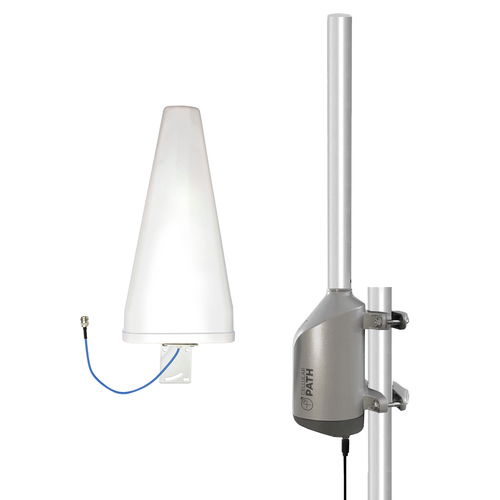
The SOCA Bring Your Own Router Yagi Kit is designed to help you get the best performance from your router without setup frustrations.
The included Bolton Yagi antenna mounts outside where cellular signal is strongest. Directional with high-gain, it can communicate with cell towers up to 5 miles away and deliver a higher-quality signal directly to your cellular router compared to traditional whip antennas.
Aiming the Yagi antenna toward your carrier's most optimal tower is key to maximizing internet speed and reliability. Featuring the Smart Self-Optimizing Cellular Antenna (SOCA) system, you don't have to worry about finding the cell tower or aiming the antenna. It auto-performs a 360° signal scan and positions the Yagi antenna with accuracy.
SOCA setup and antenna adjustment are handled through the Cellular Path app. For remote control of the Smart SOCA, a reliable internet connection is needed via WiFi or cellular using a SIM card*.
This bundle will work with any cellular router that has external antenna ports, including models from Teltonika, Peplink, Digi, Netgear, TP-Link, and more.
The result is a smarter fixed wireless access setup, receiving stronger signal and delivering more reliable speeds with less frustration.
*Kit includes a 1GB/month SIM card with 1-year of service for the Smart SOCA. Though use is optional.
Will My Cellular Router Work with this Bundle?
As long as your cellular router has external antenna ports, this bundle will work for you. It’s compatible with cellular router models from Peplink, Teltonika, Cradlepoint, Netgear, Cisco, Digi, TP-Link, and more.
What is the Difference Between the SOCA Bring Your Own Router Yagi and MIMO Panel Kits?
The main difference between the two kits is the included antenna:
- Yagi Antenna: Directional SISO (Single-Input, Single-Output) antenna. This means it can take in one signal and send out one signal at a time. With high gain up to 11 dBi and a narrow radiation beam, it can reach cell towers up to 5 miles away (depending on conditions) to enhance FWA internet. It’s ideal when range is top priority.
- MIMO Panel Antenna: Directional 2x2 MIMO (Multiple-Input, Multiple-Output) antenna. This means it can take in two signals and send two signals at a time, achieving twice the throughput compared to a Yagi. With gain up to 11 dBi and a wider radiation beam, it can also communicate with distant cell towers, but not as far as the Yagi. It’s ideal for applications needing higher data speeds and stability.
How Does the System Know What Cellular Provider to Optimize For?
In the Cellular Path app, during setup, you’ll select your preferred carrier. When running a signal scan, the system will measure the signal strength and quality for all available cellular providers. Based on RF signal data and your carrier selection, it will automatically optimize the mounted antennas' position.
What is the Included SIM Card For?
The Smart SOCA system needs a reliable internet connection. It is both WiFi and SIM capable. If unable to connect to a WiFi network, we’ve included a SIM card with 1 year of service to connect via the cellular network. The use of the SIM card is optional.
Why Does the Smart SOCA Need an Internet Connection?
The Smart SOCA needs a reliable internet connection to communicate with Cellular Path servers. This allows it to send RF signal data to the portal and receive remote alignment commands when adjustments are needed. It can connect through a broadband WiFi network, your router’s WiFi, or through the cellular network using a SIM card.
If unable to connect to a WiFi network, we’ve included a 1GB Verizon SIM card with 1 year of service. Though you’re free to use a SIM card from any US provider.
Can I Install this Bundle on an RV or Mobile Office?
Yes, but int can only be used while stationary. The directional antenna needs to be aimed towards the strongest signal source. If you move to a new location, the antenna will need to be realigned. We highly recommend taking the SOCA rotator mount down before relocating to prevent damage.