
Best Smartphone Apps to Find Your Mobile Signal Strength
Is There an App to Check Cell Phone Signal Strength?
There are two ways to check your cell signal strength: your phone's built-in Field Test Mode or a mobile signal strength app. We've already covered Field Test Mode in our signal strength guide. This article focuses on the cellular signal strength apps our in-house experts rely on.
Before getting started, we find it important to address that signal strength apps are only available on Android due to iOS restrictions. However, we'll also share the best app alternatives for iPhone users.
We fix poor cell phone signal! Find the right signal booster for you:




Best Trustworthy Signal Strength Testing Apps for Android
The Google Play Store is packed with network strength apps, each varying in usability and provided data. Here are our in-house signal experts and installers' favorites:
weBoost App (3★)
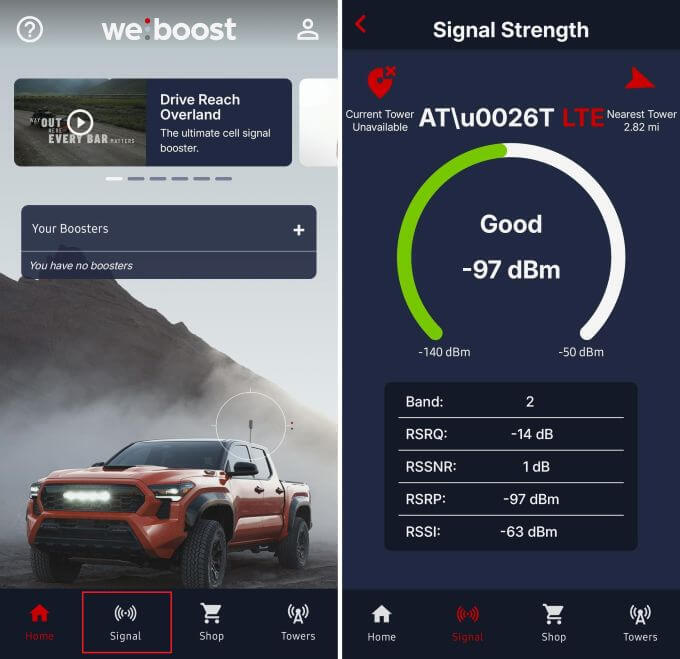
Created by the leading cell phone signal booster manufacturer, the weBoost App makes checking signal strength simple. You don't need a cell phone booster to use it. Just download the app, tap the “Signal” tab, and it will automatically measure your current 4G or 5G signal. Recent updates have improved the layout, making it extremely beginner-friendly. When adding a booster, it provides installation instructions for optimal setup.
Network Cell Info Lite (4.1★)
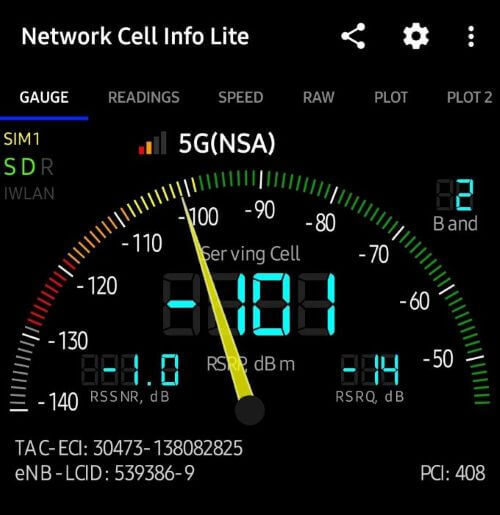
Network Cell Info Lite is the go-to app for our own Bolton Install Pros team and many professional integrators. It delivers fast, automatic signal readings as soon as you open the app, along with advanced tools for users who want more detail. It's considered one of the most accurate 5G/4G signal strength testers on Android, making it a favorite among professional installers.
Other Helpful Android Apps
Signal Strength, LTE Discovery, and Network Signal Info are also good options if you want additional testing tools. They function like basic cell phone signal detector apps, helping users see where coverage improves or drops off.
Best Trustworthy Signal Strength Testing Apps for iPhones
For iPhone users, testing signal strength is a bit trickier. Due to iOS restrictions, there are no true cell phone signal strength apps available for iPhones. Apple does not allow apps to access the raw modem data needed to display accurate signal strength readings.
The most reliable way to check your signal strength on an iPhone is through Field Test Mode. For step-by-step instructions, refer to our full signal strength guide.
If Field Test Mode doesn't work on your device, the next best option is to use speed test apps. While not as precise as dBm, they provide a clearer picture of real-world performance than signal bars.
OpenSignal
Open Signal is a trusted speed test tool that helps map where your connection performs best. While it can't show dBm, its real-time speed data can help pinpoint dead zones and stronger coverage areas.
Speedtest by Ookla
Speedtest by Ookla is one of the most popular and reliable network speed testing apps. The quick download, upload, and latency readings show how usable your connection is, which is helpful when comparing different rooms or locations.
Understanding dBm in Signal Strength Apps
Signal strength apps often show readings in dBm, and knowing what these numbers mean is the key to understanding whether your connection is strong, weak, or somewhere in between. Decibels (dB) are a logarithmic unit used to measure signal gain or loss. When you see dBm, it means “ decibels relative to one milliwatt,” which is the standard way to measure how strong your cellular signal actually is.
Unlike signal bars, dBm readings aren't subjective. They don't change based on your carrier, your phone model, or your settings. Whether you're using a cell signal strength app on Android or checking readings through Field Test Mode on iPhone, these ranges give you a general idea of what different signal levels represent:
- -50 to -79 dBm = excellent signal (4-5 bars)
- -80 to -89 dBm = good signal (3-4 bars)
- -90 to -99 dBm = average signal (2-3 bars)
- -100 to -109 dBm = weak signal (1-2 bars)
- -110 to -120 dBm = very weak or no signal (0 to 1 bar)
The closer you are to -50 dBm, the stronger and more reliable your connection. The closer you are to -120 dBm, the more likely you'll experience dropped calls, slow data, or dead zones.
Signal strength apps make it easy to visualize your readings as you move through your space. If you notice your dBm dropping indoors, that usually means building materials, distance from the tower, or surrounding terrain are blocking the signal. In these cases, you may need a cell phone signal booster to improve cellular signal indoors.
Top Cell Phone Signal Boosters to Improve Weak dBm Readings
If your signal strength app shows consistently weak dBm readings, a cell phone signal booster can help. Boosters capture the available outdoor signal, amplify it, and rebroadcast stronger coverage inside your home, vehicle, or office. Here are our top recommendations:
Most Popular Home Booster: weBoost Home MultiRoom
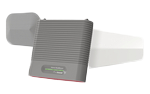
Improves 5G and 4G LTE signal in up to ~3 large rooms (up to 5,000 sq ft under best conditions). Great for reducing dropped calls and improving data speeds for all carriers and devices. Comes with a sleek indoor antenna and a drill-free install, making it a solid everyday choice for most homes.
Shop Now: $569.99Professionally Installed Home Booster: weBoost Home Complete
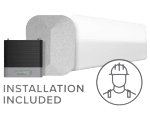
Covers up to 7,500 sq. ft. with stronger, more consistent 5G and 4G LTE signal throughout the home. Professional installation is included, ensuring the system is optimized for your home's layout and location. Works with every U.S. carrier and device, providing clear calls, faster data, and dependable coverage without any ongoing fees.
Shop Now: $1,499.99Most Popular Vehicle Booster: weBoost Drive Reach
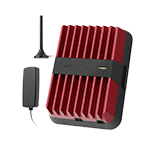
Delivers maximum FCC-approved boosting power to cars, trucks, vans, and SUVs. Its long reach to distant towers helps eliminate dead zones on rural roads and highways, keeping calls, data, and GPS stable for multiple users at once. Includes everything needed for a quick, tool-free installation.
Shop Now: $499.99Most Popular Office Booster: weBoost Office 200
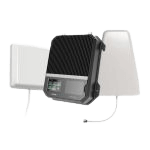
Provides stronger 5G and 4G LTE coverage for small to mid-size offices up to 10,000 sq. ft. XDR technology constantly optimizes performance to prevent shutdowns and maintain reliable signal for all carriers and devices. Features a user-friendly LCD touch screen and a straightforward DIY setup supported through the weBoost app.
Shop Now: $1,699.99See Weak dBm? Here's How We Can Help.
Signal strength apps make it easy to see how your 4G and 5G signal performs in real time, whether you're checking dBm on Android or using Field Test Mode and speed tests on iPhone. They're a helpful way to pinpoint weak areas, compare coverage throughout your space, and confirm improvements after troubleshooting.
If your readings stay low, a cell phone signal booster can help. Our team has guided thousands of customers through poor signal issues with personalized recommendations for homes, vehicles, and offices. If you're ready to improve your coverage, our complete guide on cellular signal boosters is a great place to start. You can email us at sales@wilsonamplifiers.com, call us at 1-844-466-7344, or chat with us online. We're always happy to help.


Money Back Guarantee

Technical Support