
SOCA Explained: Self-Optimizing Cellular Antenna System Deep Dive
A Smarter Way to Optimize Your Signal
Setting up a directional cellular antenna usually takes a bit of trial and error. After finding your carrier's closest cell towers, you adjust the angle, check your signal, and repeat until you find the sweet spot. When that antenna is connected to a cellular booster or fixed wireless router, those small adjustments can have a noticeable impact on performance.
The SOCA introduces a different approach, designed to take that trial-and-error process out of the equation.
We fix poor cell phone signal! Find the right signal booster for you:




What Is a SOCA?
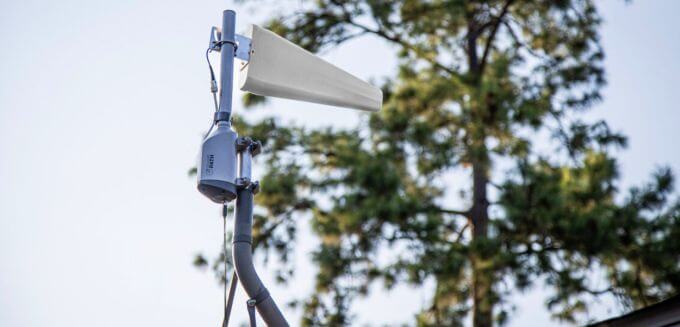
The SOCA, developed by Cellular Path, stands for Self-Optimizing Cellular Antenna. Despite the name, it's not actually an antenna. It's a motorized system designed for directional antenna mounting, automatically positioning the antenna to receive the best possible signal.
Once installed, the SOCA scans available cell signal, analyzes performance, and rotates the antenna toward the strongest signal source. This removes the need for manual aiming and repeated adjustments. For installers, integrators, and IT teams, it also adds remote visibility and repositioning, making it easier to manage and optimize systems without returning on-site.
Smart SOCA vs No-Modem SOCA
Cellular Path offers two versions of the SOCA: the Smart SOCA and the No-Modem SOCA. Both are built to do the same core job, scanning available signal and automatically positioning a directional antenna for the best possible performance.
The difference comes down to how each model connects, what it can measure, and the types of systems it's designed to support. The Smart SOCA is the more flexible option, working with both cellular boosters and fixed wireless setups. The No-Modem SOCA is designed specifically for fixed wireless access (FWA) and works with select compatible cellular routers.
Here's a quick side-by-side look:
|
Feature |
Smart SOCA |
No-Modem SOCA |
|
Use Case |
Cellular boosters & fixed wireless access |
Fixed wireless access only |
|
Compatibility |
Works with any cellular booster or router |
Teltonika RUT241, RUTM50 |
|
Internet Connection |
SIM or WiFi |
WiFi only |
|
Signal Scanning |
Scans all available carriers |
Scans selected carrier only |
|
Price |
$479.99 |
Contact Us for Purchase |
SOCA Components Breakdown
To understand how the SOCA works, it helps to look at the components that make up the system. Each part plays a role in optimizing antenna positioning and giving you remote visibility.
Rotator Pole
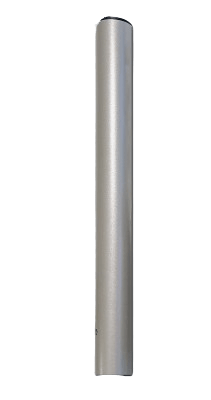
This is where your directional antenna is mounted. It supports common directional antennas like Yagi, LPDA, and parabolic grid antennas, and can handle up to 100 pounds. The antenna itself is not included in standalone kits.
Rotator
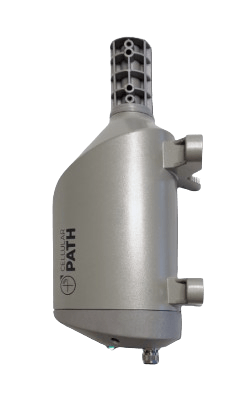
The rotator is the motorized unit that physically turns the antenna. It mounts to an existing mast or pole and is responsible for rotating the antenna during signal scans and positioning it.
Controller
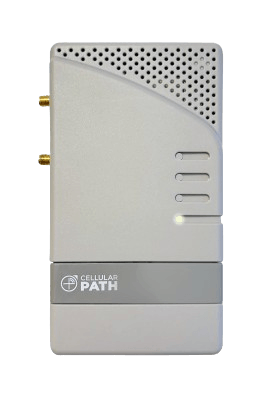
The controller acts as the system's command center. It connects to Cellular Path's servers through an internet connection, allowing it to receive instructions and send back detailed signal data.
With the Smart SOCA, this connection can be made through either WiFi or a SIM card, offering more flexibility depending on your setup. The No-Modem SOCA connects via WiFi only.
Cellular Path App
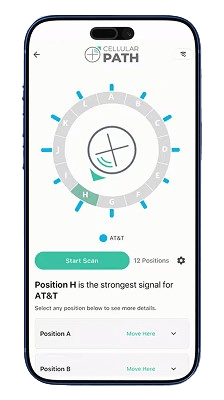
The app ties everything together. It guides you through setup and allows you to:
- Run signal scans
- Select your preferred carrier
- View detailed signal metrics (RSSI, RSRP, RSRQ, and SINR)
If you're managing multiple units, you can organize them by location and project name within the same account, making it easier to monitor and adjust systems remotely. A web-based portal is also available for additional visibility and control.
How the SOCA Works
While the Smart SOCA and No-Modem SOCA differ in how they connect and use cases, the overall process is the same.
It starts with mounting your directional antenna to the rotator pole and setting up the system through the app. The controller connects to the internet (either via WiFi or SIM with the Smart SOCA, or WiFi only with the No-Modem SOCA). From there, you select your preferred carrier and begin a signal scan.
Once the scan starts, the rotator rotates the antenna and stops at set points to measure signal, performing a full 360-degree sweep. By default, the system performs a 12-point scan, though this can be adjusted to as few as 2-points. The Smart SOCA scans and collects data across all available carriers, while the No-Modem SOCA focuses on the selected carrier.
After the scan is complete, the system analyzes the data and automatically positions the antenna in the direction that delivers the strongest, cleanest signal. In the app, you can review signal readings at each point, compare results, and manually adjust the final position if desired.
Once aligned, your cellular booster or router receives a stronger, higher-quality signal, helping improve overall performance. If conditions change over time, you can run another scan and re-optimize the antenna remotely through the app without needing to physically adjust the setup.
Key Benefits of the SOCA
The SOCA simplifies one of the most time-consuming parts of improving cellular signal by automating antenna positioning and enabling remote control.
- Eliminates Manual Aiming: No more climbing up on the roof and adjusting the antenna. The SOCA automatically finds the best direction for you.
- Saves Setup Time: Instead of repeated trial and error, the system scans and locks onto the most optimal position in one pass.
- Reduces Truck Rolls: Installers can make adjustments remotely through the app or portal, saving on travel costs to visit the site.
- Simplifies Multi-System Management: Monitor, scan, and adjust multiple locations from a single interface, without managing each system individually.
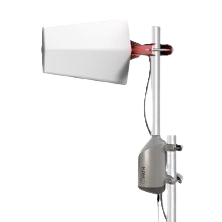
Set up your directional cellular antenna right the first time with the Smart Self-Optimizing Cellular Antenna System.
More Details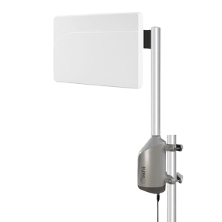
Get the most out of your fixed wireless access network with the No-Modem Self-Optimizing Cellular Antenna System.
More DetailsInstallation Considerations
Before getting started, it's important to note that standalone SOCA units do not include a directional antenna or the coaxial cables needed for a complete setup. You'll need to pair the system with a compatible antenna, such as a Yagi, LPDA, or parabolic grid, along with the appropriate cabling.
For a more streamlined setup, fixed wireless access bundles are available that include all the necessary components.
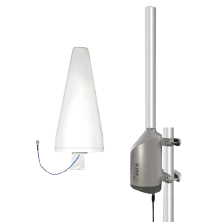
Includes everything you need to enhance your cellular router's performance. MIMO antenna version is also available.
More Details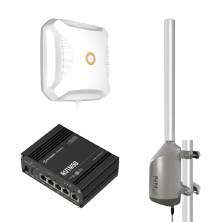
Build a resilient Fixed Wireless Access network. Includes everything needed for setup.
More DetailsFor step-by-step installation details and system requirements, you can review the user manuals below:
Find the Right SOCA for Your Setup
The SOCA is meant to take the guesswork out of directional antenna setup, helping you get the strongest possible signal without the time and effort of manual adjustments. No matter if you're working with a cellular booster or a fixed wireless access network, it offers a more efficient, reliable way to optimize performance.
If you're ready to simplify your setup, you can explore the Smart SOCA, No-Modem SOCA, or look into fixed wireless access bundles that include everything needed for installation.
Not sure which option is right for your setup? Our team can help you choose the best SOCA solution based on your signal conditions, equipment, and goals. Give us a call at 1-800-568-2723 for a personalized recommendation.


Money Back Guarantee

Technical Support